In 30 seconds
What is a DPS meter in AION 2?
DPS means damage per second. A DPS meter collects every hit and shows the result of the fight.
AION 2 has a built-in Combat Analysis window. It counts only your damage: DPS, damage per skill, crits and back attacks, keeps records and starts on its own when you hit a dummy or a boss. It does not show the damage of your whole party — that is what an external DPS meter is for.
| What you see | In-game Combat Analysis | TeamMate |
|---|---|---|
| Your damage and DPS | yes | yes |
| Damage of every party member | no | yes |
| Damage per skill, crits, back attacks | yes | yes |
| Fight history | records | every fight with breakdown and comparison |
| Share a fight with a link | no | yes, in fight logs |
| Field Boss, Rift and Shugo timers | no | yes |
With a DPS meter you see what you cannot see by eye:
- your DPS and contribution — what share of the boss damage was yours;
- damage per skill — hits, crits, average and maximum hit;
- back and front attacks, double and perfect hits, multi-hits and parries;
- downtime — seconds when you were not hitting anything;
- party damage — who carries the fight and who is idle.
TeamMate — a free AION 2 DPS meter
TeamMate is our Windows app for AION 2 Global. Its DPS meter is free and works without a key. The interface is in English and Russian; skill and monster names come from the game client.
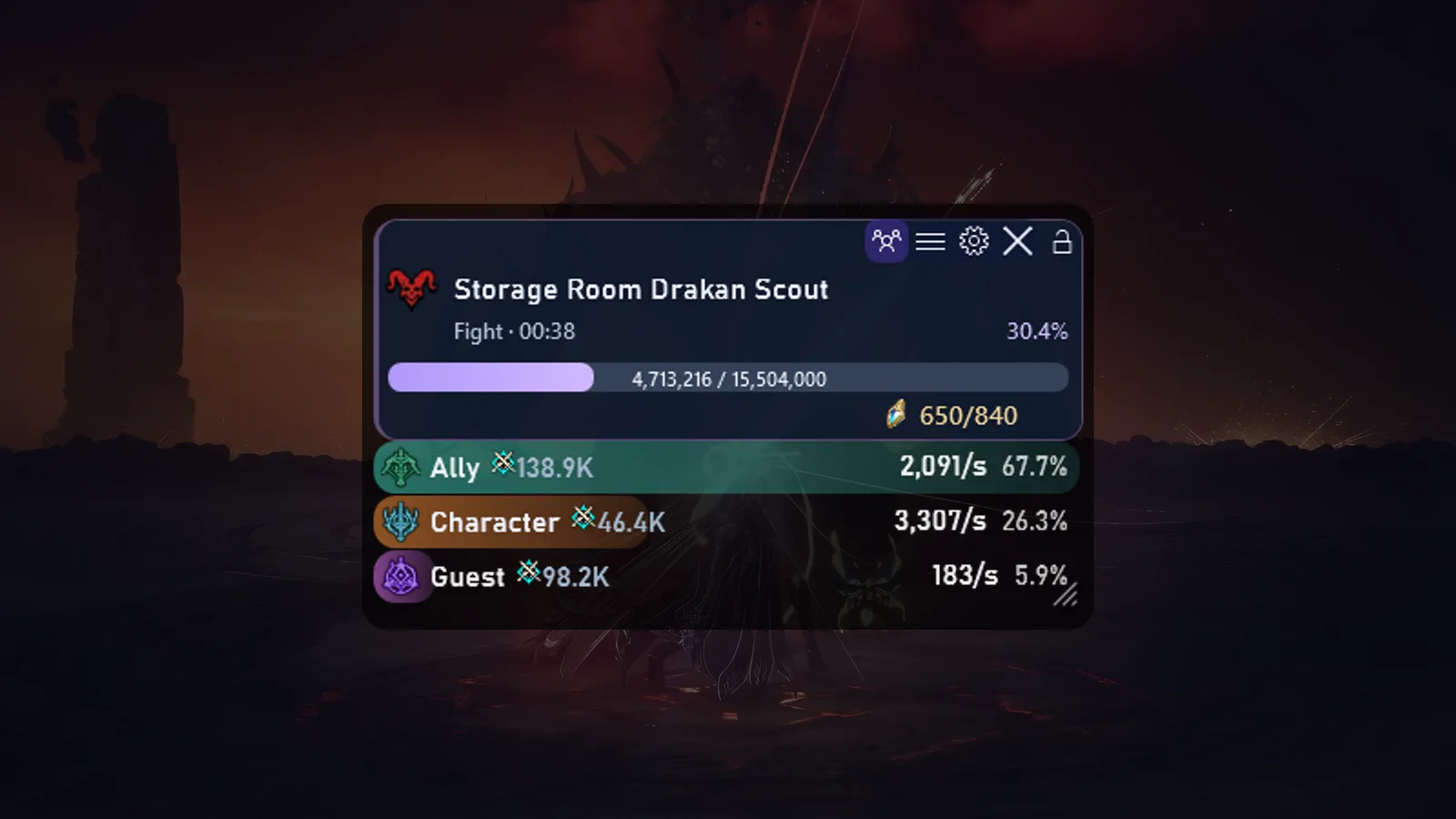
The overlay sits on top of the game. In combat it shows:
- the target — boss or monster name, HP bar and percentage;
- fight time;
- one row per participant — damage, DPS and share, with class icon and Combat Power;
- out of combat — a compact panel with Field Boss, Rift and Shugo timers.
You can lock the overlay in place, collapse it to a slim strip and switch between solo (only you) and group modes.
The DPS meter window
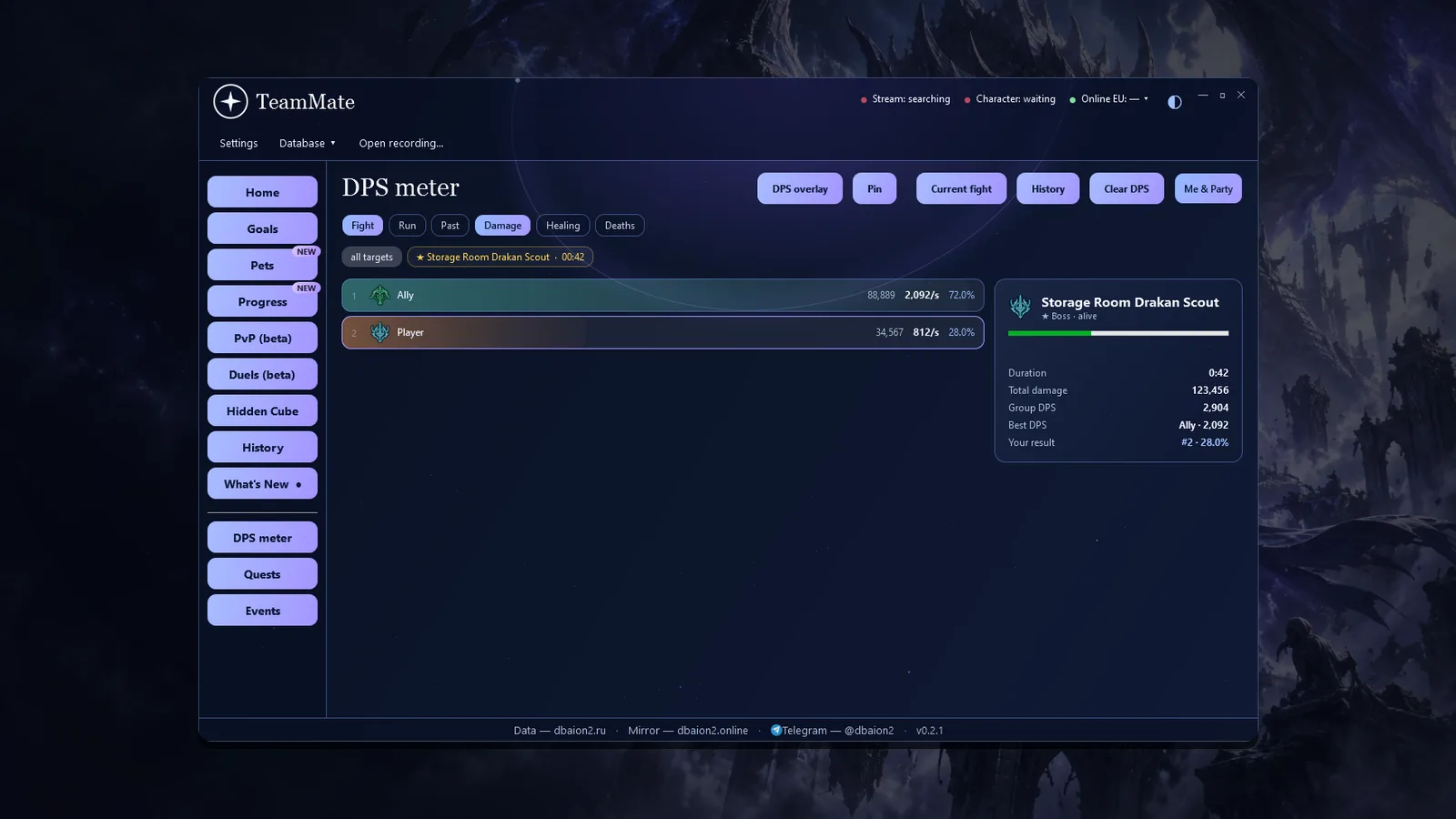
In the app the DPS meter has its own section with the current fight, the whole run and past fights. Switch between damage, healing and deaths; the card on the right shows duration, total damage, party DPS, best DPS and your rank.
Fight breakdown: skills, crits, back attacks
Click a fight to open the detailed breakdown. This is the main tool to understand why your damage is what it is.
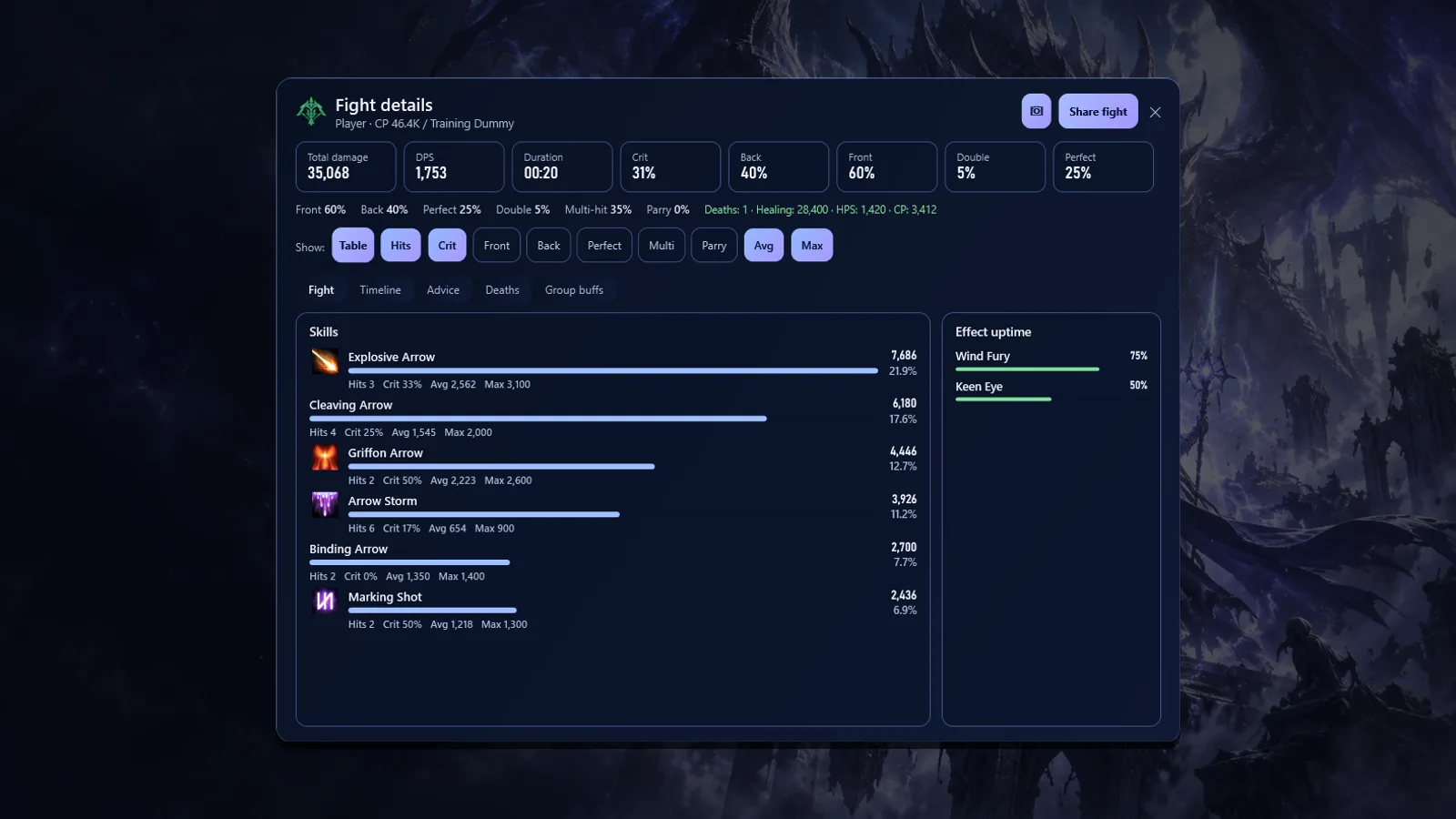
What the breakdown shows
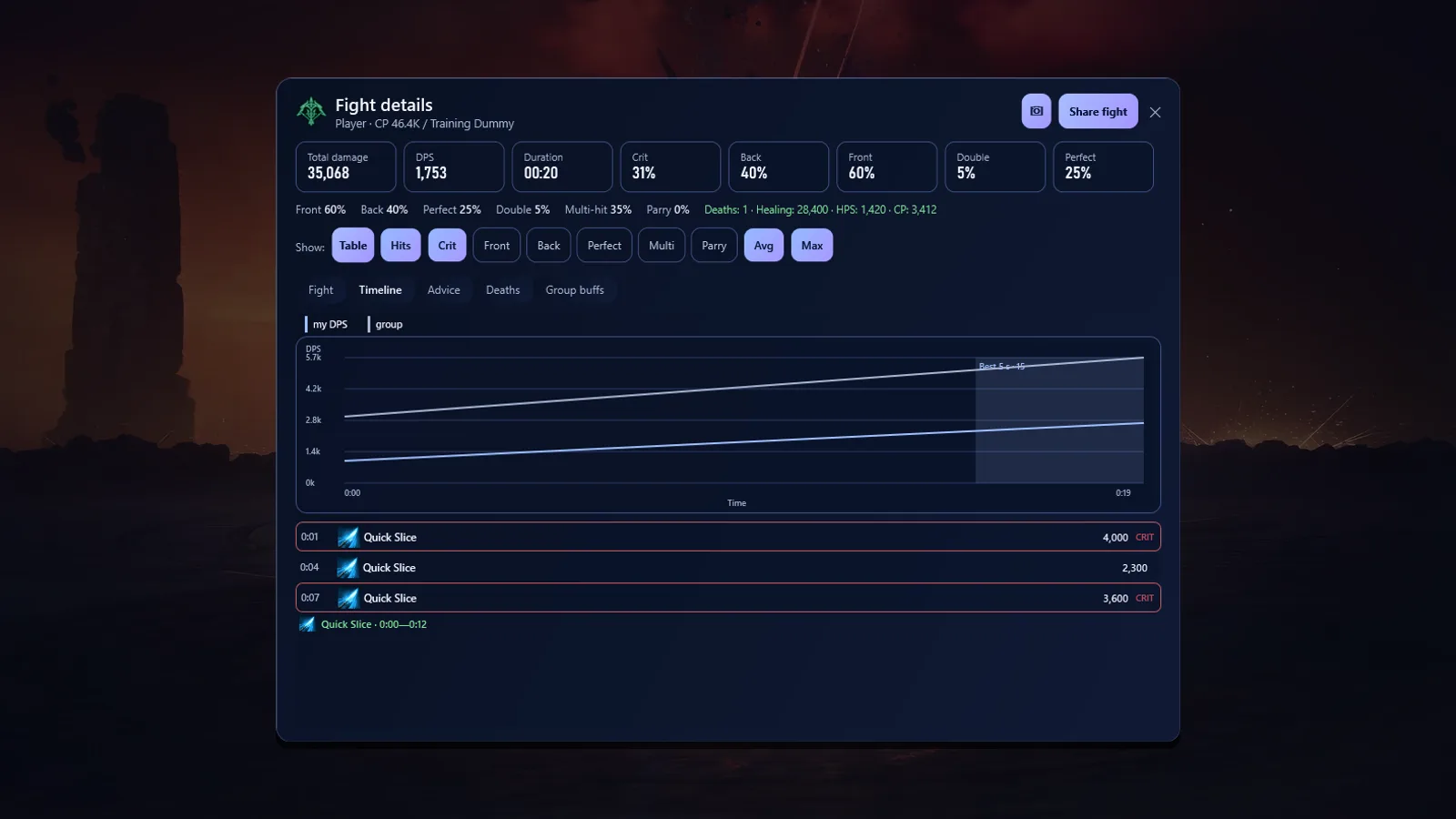
You can share a fight: «Share fight» publishes it to the fight logs on our site, and you can send the link to your party or legion.
How to test your rotation on a dummy
The fairest way to compare skill combos is a training dummy: it has no mechanics and you can repeat the fight as often as you like.
Rotation test
- First fightHit the dummy for 30–60 seconds with your usual rotation. Keep the same duration in every attempt.
- Second fightChange one thing: skill order, specialization, stigma or manastone.
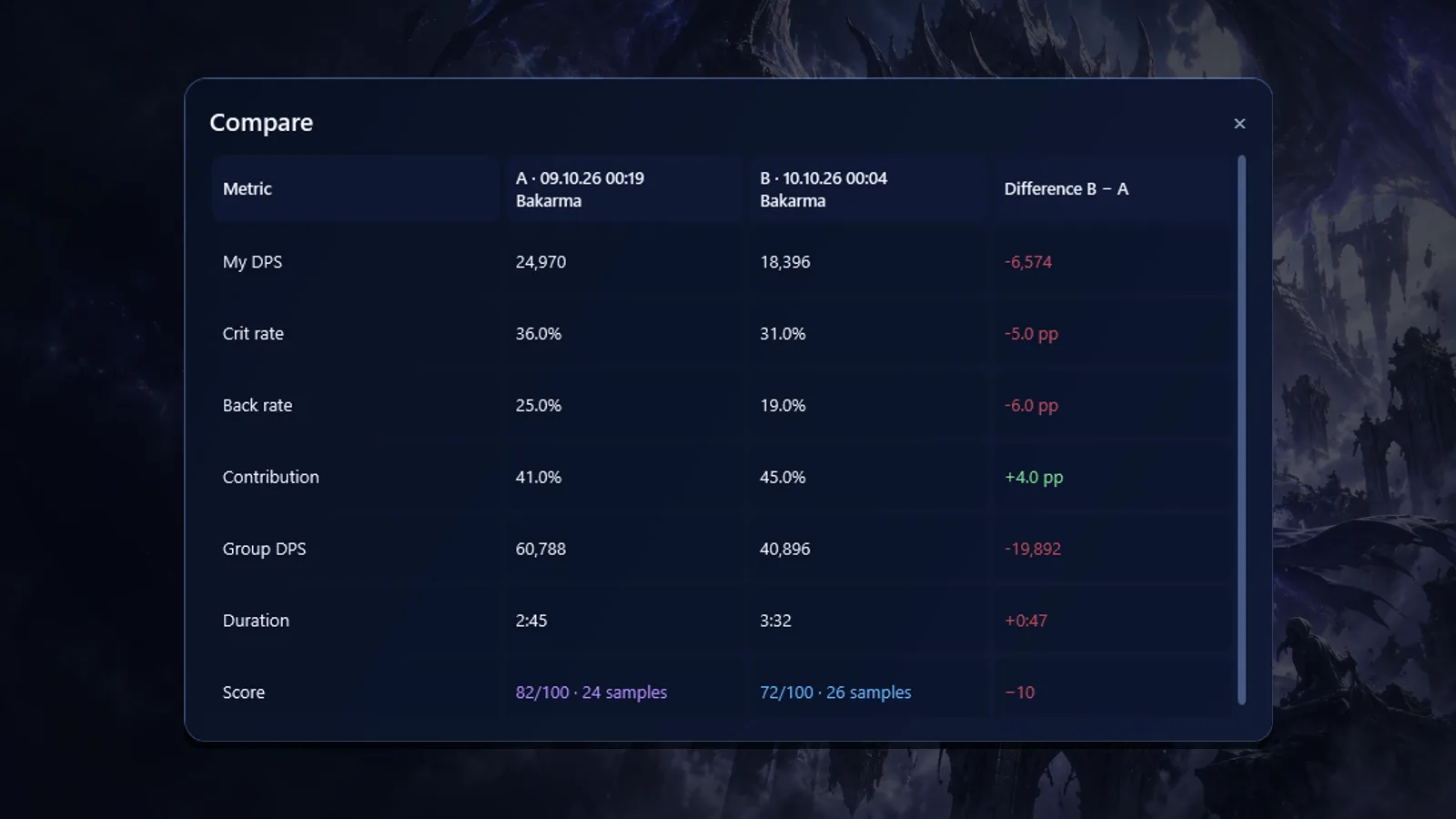
- CompareOpen the history and compare both fights: DPS, crits, back attacks, contribution and the difference.
- DecideKeep what gave more DPS. Change one thing at a time — otherwise you will not know what worked.
Boss timeline and events
In a boss fight the overlay can show a boss timeline — the next heavy attacks with a countdown. Out of combat it shows Field Boss, Rift and Shugo timers, and TeamMate reminds you about marked bosses in advance with an in-game notification.
How to install the DPS meter
Install in 3 steps
- DownloadThe TeamMate installer for Windows 10/11 is on the app page.
- Install NpcapThe installer offers to install it: TeamMate sees combat data through Npcap.
- Launch before loginOpen TeamMate before your character enters the world, so the app recognises your character and party right away.
Is a DPS meter safe to use?
TeamMate passively reads network traffic through Npcap. It does not modify game files, does not read or change game memory and does not send any commands to the game. This is how DPS meters work in most online games.
To be honest: nobody can guarantee how the game operator treats third-party tools. The decision is yours.
FAQ
Is the DPS meter really free?
Yes. Damage, DPS, HPS, participants and contribution, skills and crits, history, fight comparison and breakdowns, the overlay and the fight summary are free with no time limit. The PRO subscription adds other tools: the hidden cube arrow, pet progress, farm sessions and goals.
How is TeamMate better than the built-in Combat Analysis?
The built-in analysis counts only your damage. TeamMate shows the damage and DPS of your whole party, keeps every fight with a second-by-second breakdown, compares attempts and lets you share a fight with a link.
Do I need a separate app for DPS?
No. The DPS meter is part of TeamMate — it is one app.
Does it show party damage?
Yes. Group mode shows every participant of the current fight the app can see; solo mode shows only your character.
Which systems are supported?
TeamMate is made for AION 2 Global on Windows 10/11 (64-bit). The interface is English or Russian.
Summary
A DPS meter is the fastest way to know whether you play your class well. Install TeamMate, hit a dummy with two rotations, compare the fights and keep the one that deals more damage. All of it is free.
Comments